

Scan-to-verify for printed documents.
ANANKE T-CODE stamps a T-DOC DataMatrix onto printed documents and records, linking them to a verifiable digital record on ANANKE's trust layer. Approved verifier organizations scan with the ANANKE Mobile app to confirm authenticity, integrity, and lifecycle status.
Printed Record
Physical original
T-DOC Code
Digital seal
Verified
AuthenticThe problem we solve
Printed documents live in the real world — handed from person to person, photocopied, emailed as images. Once a document leaves your hands, there is no standard way to confirm it is genuine.
T-CODE bridges the physical and digital worlds. A small stamp on the page becomes the key to instant, cryptographic verification.
What is T-CODE?
T-CODE embeds a T-DOC DataMatrix — a compact, machine-readable stamp — directly onto printed documents. This stamp encodes a reference back to a verified digital record, enabling approved verifier organizations with an ANANKE account to verify the document by scanning it.
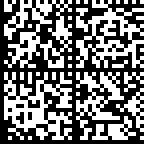
What a T-DOC DataMatrix looks like
The T-DOC DataMatrix is a compact, high-density barcode stamped directly onto the printed document. It carries the references needed for verification and fast scan checks.
What T-CODE does for your organization
Key capabilities that bring verifiable trust to your printed documents.
Make any printed document verifiable
Stamp a T-DOC DataMatrix on certificates, transcripts, letters, or any printed document. Approved verifier organizations scan with the ANANKE Mobile app and receive a structured verification result.
Detect fraud and tampering
Online verification checks protected evidence and can provide a digital-twin comparison. Changes outside the protected scope or a copied marker require that comparison and verifier judgment.
Access the digital twin
After scanning, verifiers can view the protected digital version of the document — a sealed copy of the original PDF. Compare the physical document to the digital twin side by side.
Track lifecycle in real time
Revoked a certificate? Suspended a license? Scanning the T-CODE stamp always reflects the current status — even if the physical copy was printed months ago.
Issue at institutional scale
Stamp single documents through the web application, or process thousands at once via bulk upload. The T-CODE process runs alongside ANANKE Trust issuance.
Build a defensible audit trail
Every stamp creation, scan, and status change is recorded. Full accountability for compliance and dispute resolution.
How it works
From stamping to scanning — the complete T-CODE workflow.
Issue and stamp your documents
When you issue a document through ANANKE Trust with T-CODE enabled, the system generates a T-DOC DataMatrix and embeds it onto the protected PDF. Use the web application or the Integration API.
Print and distribute
Print the stamped document and hand it to the recipient, mail it, or post it. The T-DOC DataMatrix travels with the document — no separate QR card, no extra attachment.
Scan to verify
An authorized verifier with the ANANKE Mobile app scans the T-DOC DataMatrix. The app performs scan checks, connects to the ANANKE platform, and returns a structured verification result in seconds.
View the digital twin
After verification, the mobile app gives access to the digital twin — the protected, sealed version of the original document. Verifiers can compare the physical copy to the original side by side.
The digital twin: bridging physical and digital
When a T-CODE stamp is scanned, the verifier does not just get a 'valid' or 'invalid' answer. They get access to the digital twin — a sealed, protected version of the original document stored securely in ANANKE infrastructure.
What a verifier sees after scanning
When someone scans a T-DOC DataMatrix, the ANANKE Mobile app presents a clear, structured result — not raw data. The issuer controls what fields are visible to verifiers.
Scan a T-CODE to verify any document.
Coming soon: T-Object
T-CODE currently supports T-DOC — a DataMatrix stamp for printed documents. We are building T-Object, which extends the same verification model to physical products and non-document items.
Interested in T-Object for your use case? Contact us to discuss.
Who is T-CODE for?
Any organization that prints documents others need to trust.
Universities
Print diplomas and transcripts with T-DOC DataMatrix stamps. Employers scan to verify instead of calling your registrar office.
See how it worksGovernment agencies
Permits, birth certificates, licenses — any official document that circulates in printed form and needs to be verified across borders.
Discuss your use caseEnterprise
Certificates of conformity, training certifications, vendor audit letters — stakeholders scan to confirm authenticity instantly.
Discuss your use caseHealthcare
Medical certificates, prescription authenticity, professional license verification — critical documents where fraud can have real consequences.
Discuss your use caseSecurity and data handling
T-CODE is built for organizations that handle sensitive printed documents. Here is how we protect your data:
T-CODE FAQs
Ready to make your printed documents verifiable?
We are building the infrastructure to bring verifiable trust to physical documents. Contact our team to discuss your use case.